 BirdieBook WNY
BirdieBook WNY
BirdieBook WNY
Your guide to mastering BirdieBook.
From the main dashboard, tap Enter Score.
Search for your course in the search bar.
Once selected, choose your Tees and round format (18 Holes, Front 9, or Back 9).
Finally, tap the green Start Live Round button.
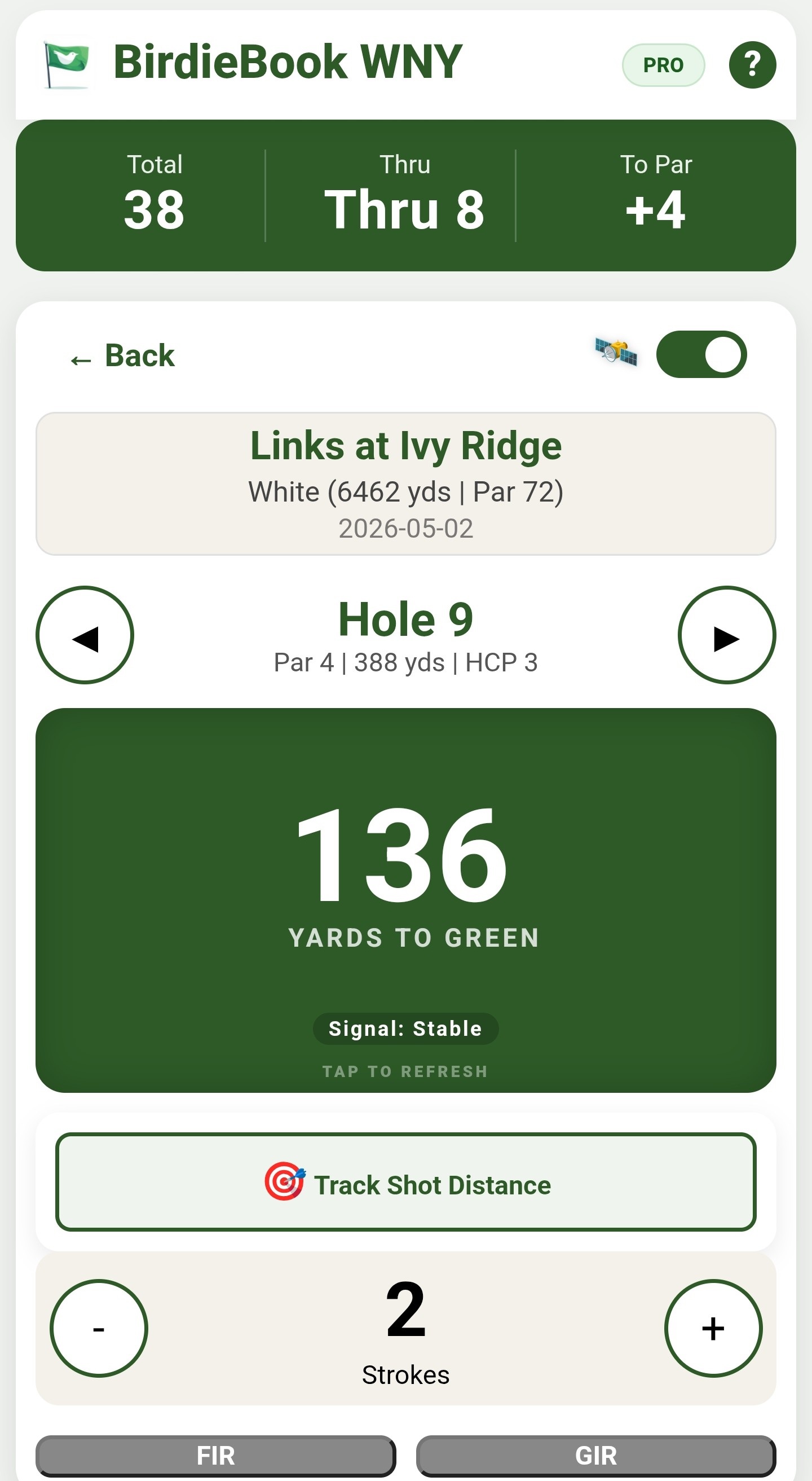
The large center number is your yardage to the center of the green. The accuracy badge at the bottom tells you the GPS signal strength.
When the numbers turn white, the GPS is locked on and you're ready to pull the right club.
If the numbers on the screen are red or yellow, hold still, the app is still acquiring your precise coordinates.
From the main dashboard, tap Enter Score.
Search for your course in the search bar.
Once selected, choose your Tees and round format (18 Holes, Front 9, or Back 9).
Then, tap the Post-Round Entry button.
Finally, enter the date of your round and click the Confirm Date & Start button.
Manually enter your scores for each hole into the scorecard.
Don't forget to click the Submit Round button when you're done!
Tap Round History from your dashboard. This list shows every round you've recorded, including your score, par for the course, and the calculated handicap differential for that round.
On the Round Setup screen, scroll to the bottom and tap Request an Addition.
Select the proper button to indicate if you're requesting a new course to be added, or a new set of tees for a course already in BirdieBook.
You can upload a photo of a scorecard or enter the details manually, and our team will add it to the catalog usually within 24–48 hours.
Because BirdieBook is a handicap tracking application, the course and tees must have a slope and rating with the USGA to be added.
During a live round, tap the Track Shot Distance button while standing at your ball.
Select the club you're going to hit.
Hit your shot and walk to your ball; the app will track the distance in real-time.
Once you reach your ball, tap Finish Shot & Record.
Access the Membership view from the dashboard by clicking on your Membership type in the top right corner of the screen.
Here you can see your "Member Card", expiration date, and how many days of BirdieBook access you have left.
Click Extend Membership to view pricing and renew via Stripe.
From the Dashboard, tap Round History and then the View Detailed Analytics button at the top.
For club-specific data, tap Clubs from the main dashboard to see your "Virtual Bag". You can view individual club trends by clicking the stopwatch icon in the upper right corner of each club's card.
Rounds: In Round History, tap the 🗑 icon next to the round.
Shots: In the Clubs view, tap the stopwatch icon in the upper right corner of the club card to see its history, then tap the 🗑 icon next to the shot you wish to remove.
BirdieBook is a Web App, meaning you don't need the App Store.
iOS (iPhone): Tap the Share icon (square with an up arrow) in Safari and select Add to Home Screen.
Android: Tap the three dots in the corner of Chrome and select Install App or Add to Home Screen.
Yes. All payments are handled by Stripe, the world's leading payment processor. BirdieBook never sees or stores your credit card data. We only receive a confirmation from Stripe that the transaction was successful.
1. Verify you're using Chrome (on Android) or Safari (on iPhone).
2. Ensure Location Services are enabled for your browser and for BirdieBookWNY.com in particular.
3. Avoid using "Battery Saver" mode, as it can throttle GPS updates.
4. Verify you selected the correct course and you've navigated to the proper hole.
5. Stand still for 3–5 seconds to allow your phone to acquire a precise satellite lock. Once your distance to the green number turns white, you're locked on!
When logging in, make sure to check the Keep me logged in for 30 days box. This stores a secure token on your device so you don't have to type your password every time you're on the first tee.
The remember me function is specific to your device and browser. If you want to be remembered on a different device and/or browser, repeat the process there as well.
If you accidentally close the app during a round in progress, simply open it again. The dashboard will automatically detect the "Unfinished Round" and prompt you to Resume or Discard it.
Course Rating: The score a "scratch" golfer (0 hcp) should shoot on that given course and set of tees on a good day.
Slope: The relative difficulty for a "bogey" golfer. The higher the number, the harder the course and tees for a normal golfer. This number is a difficulty rating (55 - 155), it is not measured in strokes like Course Rating is.
Your Differential is a measure of how well you played based on the course difficulty - the lower the number, the better your performance.
A Handicap Index represents your potential as a golfer.
BirdieBook follows the WHS (World Handicap System) standard: we take your best 8 differentials out of your last 20 rounds and average them.
For handicap purposes, the maximum score you can record on any hole is called a Net Double Bogey. This prevents one "blow-up" hole from unfairly inflating your handicap index.
Basically all of them!
WHS rules recently changed to allow 9 hole scores to be counted towards your handicap index immediately. And as long as the course you're playing has a rating and slope registered with the USGA, you can count your 9, or 18 hole round towards your index. You can even play the local par 3 with your kids and count that round towards your index!
BirdieBook uses the official USGA/WHS formulas for calculating your handicap.
However, some strictly regulated tournaments require a "Certified GHIN" handicap. Check with your tournament / league director to see if they will accept a BirdieBook handicap index.
BirdieBook uses pro-style notation:
Double Circle: Eagle or better
Single Circle: Birdie
No Symbol: Par
Single Square: Bogey
Double Square: Double Bogey or worse.
FIR (Fairway in Regulation): Did your tee shot land in the fairway? (Par 4s and 5s only).
GIR (Green in Regulation): Did your ball reach the putting surface in (Par - 2) strokes? (e.g., 1 stroke on a Par 3, 2 strokes on a Par 4).
We're here to help! Shoot us an email at [email protected] and we'll get you sorted out.